

Ontology-Driven Knowledge Platform
OntoQ
Ontology-Driven Knowledge Platform
OntoQ
Organise business knowledge once. Ask questions naturally. An ontology platform that brings documents, data, and decision evidence together.
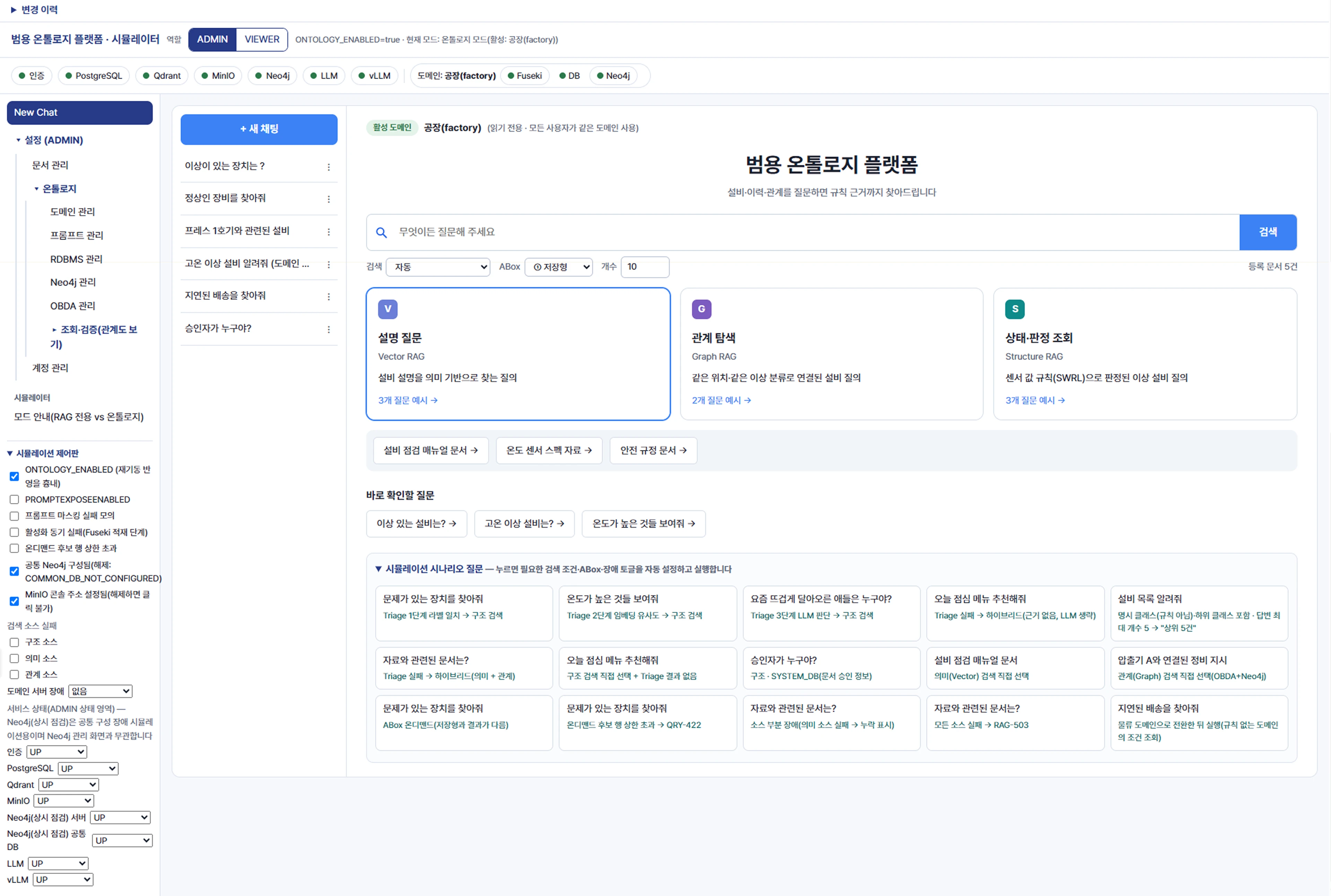 OntoQOntoQ
Overview
Connect business knowledge. Understand the evidence.
Search data and documents using registered business dictionaries and rules, and see why each answer was reached.

Unified document, DB, and graph search
Find business data, documents, and relationships through a single question.
Answers with visible evidence
Review applied rules, data values, source documents, and relationship graphs alongside each answer.
Extend to new domains without code
Expand to other teams and workflows with dictionary and rule definitions and data connections.Comparison
Beyond document search: business data and decision evidence
OntoQ adds dictionaries, rules, business databases, and relationships to conventional RAG document search.
| Category | Conventional AI (chatbot) | Conventional RAG server | OntoQ |
|---|---|---|---|
| Knowledge sources | Pretrained general knowledge | Registered documents | Dictionaries and rules + business DB + documents + relationships |
| Facts and aggregates | Cannot access company data | Relies on document text | Queries business databases directly |
| Decision criteria | May vary by question or context | AI interprets document explanations | Applies registered rules consistently |
| Following relationships | Not available | Limited to similar documents | Traverses connections and displays a graph |
| Answer evidence | Absent or unclear | Source documents | Source documents + applied rules + relationship graph |
| When no results exist | May generate a plausible answer | Answers from document content | Reports no results without asking AI |
Knowledge sources
- Conventional AI (chatbot)
- Pretrained general knowledge
- Conventional RAG server
- Registered documents
- OntoQ
- Dictionaries and rules + business DB + documents + relationships
Facts and aggregates
- Conventional AI (chatbot)
- Cannot access company data
- Conventional RAG server
- Relies on document text
- OntoQ
- Queries business databases directly
Decision criteria
- Conventional AI (chatbot)
- May vary by question or context
- Conventional RAG server
- AI interprets document explanations
- OntoQ
- Applies registered rules consistently
Following relationships
- Conventional AI (chatbot)
- Not available
- Conventional RAG server
- Limited to similar documents
- OntoQ
- Traverses connections and displays a graph
Answer evidence
- Conventional AI (chatbot)
- Absent or unclear
- Conventional RAG server
- Source documents
- OntoQ
- Source documents + applied rules + relationship graph
When no results exist
- Conventional AI (chatbot)
- May generate a plausible answer
- Conventional RAG server
- Answers from document content
- OntoQ
- Reports no results without asking AI
Features
From questions to evidence, in one platform
Users ask questions and review evidence. Administrators manage business knowledge and connections.
Natural Language Q&A
Natural-language questions and answers
Ask questions using familiar business terms. Continue the conversation to explore the results.
- Search modes
- Automatic (default), structured, semantic, graph, and hybrid
- Query modes
- Stored results (default) or on-demand calculation
- Continue conversations
- Review conversation history and each answer’s business domain
Explainable Evidence
Evidence-based answers (XAI)
See why an answer was reached by reviewing the applied rules and sources directly below it.
- Evidence cards
- Expand applied rules, data values, and source documents
- Relationship graph
- See the equipment, documents, and entities linked to an answer
- Detailed validation
- Administrators can also inspect query commands and search plans
Rule-based Reasoning
Rule-based decisions
Register business criteria, such as threshold violations, and apply consistent rules to the same data.
- Register decision rules
- Define explicit rules for the criteria used in your work
- Consistent decisions
- Classify entities using registered criteria and show evidence
- Update criteria
- Revise rules and regenerate knowledge data to apply changes
Domain Management
Business domain management
Organise dictionaries, rules, and data connections by domain. Use the same approach across new teams and workflows.
- Register definitions
- Register concepts, properties, rules, and data mappings
- Validate connections
- Check dictionary, DB, and document connections when saving
- Switch domains
- Activate a domain to apply it from the next question
Document & Graph Search
Document and relationship search
Explore meaning in documents and links between entities to understand context beyond document search.
- Semantic search
- Search PDF, Word, and Excel content by meaning
- Graph search
- Follow related entities and documents in a relationship graph
- Start with documents
- Begin document search without setting up a business domain
Admin & Operations
Administration and operations
Manage documents, knowledge, and AI instructions together. Monitor platform operations within your organisation.
- AI instructions
- Review answer instructions and restore previous versions
- Status monitoring
- Check login, storage, AI server connections, and synchronisation
- Safe queries
- Use read-only access and query result limits
Explainable Evidence
See why decisions were made in a relationship graph
Connect business concepts to real data and review the applied rules and decision results.
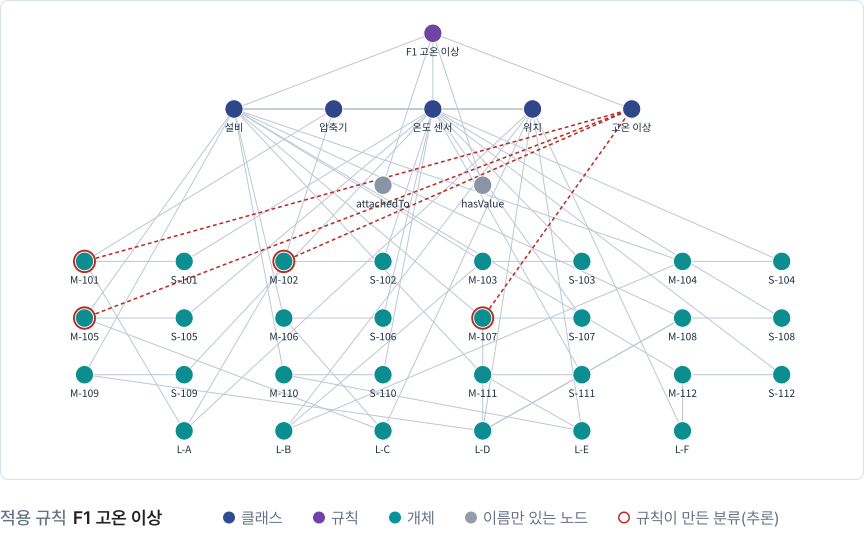
Runtime Pipeline
How a question becomes an answer backed by evidence
AI plans the search. Validated programs perform the actual queries with read-only access.
- 1
Ask a question
Use familiar language. The search mode is selected automatically.
- 2
Connect concepts
Map question terms to concepts and relationships in the business dictionary.
- 3
Plan the search
AI plans what to find and which search methods to use.
- 4
Build and validate queries
Programs create query commands and validate them against registered definitions.
- 5
Search in parallel
Run structured, semantic, and graph search together. Use remaining results if one search fails.
- 6
Answer with evidence
Build answers only from collected evidence. Provide evidence cards and relationship graphs.
Architecture
An ontology platform that runs entirely on your own servers
Separate question processing from knowledge generation and connect business data with read-only access.
Users (web interface)
End usersAdministratorsAccess
GatewayQuery processing
Query processing serverAI model serverKnowledge stores
Knowledge data storeGraph storeDocument search storeFile storeSynchronisation processBusiness database
View component details
- End users
- Ask questions · review evidence
- Administrators
- Manage documents, domains, and instructions
- Gateway
- Authentication and permissions
- Query processing server
- Analyse questions · orchestrate search Compose answers (rag_service)
- AI model server
- On-premise GPU · vLLM
- Knowledge data store
- Dictionary and rule data (Fuseki)
- Graph store
- Relationship data (Neo4j)
- Document search store
- Semantic search (Qdrant)
- File store
- Source documents and definitions (MinIO)
- Synchronisation process
- Definitions + business data → knowledge data
- Business database
- PostgreSQL Read-only
Users (web interface)
End users
Ask questions · review evidence
Administrators
Manage documents, domains, and instructions
Access
Gateway
Authentication and permissions
Query processing
Query processing server
Analyse questions · orchestrate search Compose answers (rag_service)
AI model server
On-premise GPU · vLLM
Knowledge stores
Knowledge data store
Dictionary and rule data (Fuseki)
Graph store
Relationship data (Neo4j)
Document search store
Semantic search (Qdrant)
File store
Source documents and definitions (MinIO)
Synchronisation process
Definitions + business data → knowledge data
Business database
PostgreSQL Read-only
Question processing flowKnowledge generation flow
Use Cases
Different workflows. The same approach to evidence.
Register domain dictionaries, rules, and data connections to use them on the same platform.
Equipment and process checks
- Question
- “Find devices in the factory with problems.”
- Process
- Map dictionary concepts → high-temperature rule → equipment DB query → related documents
- Result
- Abnormal equipment, locations, applied rules, and sensor evidence
Test, quality, and compliance search
- Question
- “Why was the test repeated, and what was the procedure?”
- Process
- Query test records and approvals + semantic search of SOP documents
- Result
- Reasons, procedures, approvals, and source documents
Operational status queries
- Question
- “Which deliveries are delayed, and what contract clauses apply?”
- Process
- Query delivery and inventory status + search contracts and policy documents
- Result
- Status tables, related clauses, and relationship graphs
Ideal Use Cases
Built for these teams and workflows
For work that combines documents and business data and requires evidence behind decisions.

Teams with business data in databases
Environments that need natural-language queries for facts, status, and aggregates stored in business databases

Work with clear decision criteria
Work that registers business criteria as rules and applies the same standards to the same data

Decisions requiring verifiable evidence
Work that reviews applied rules, data values, and source documents alongside answers

Work combining documents and data
Work that checks business status, related documents, and connections between entities in one place

Organisations expanding across departments
Teams extending use through new domain dictionaries, rule definitions, and data connections

Environments with restricted data sharing
Organisations that operate internal data using AI models and storage on their own servers