

Enterprise Multi-Agent Platform
AgentQ

Enterprise Multi-Agent Platform
AgentQ
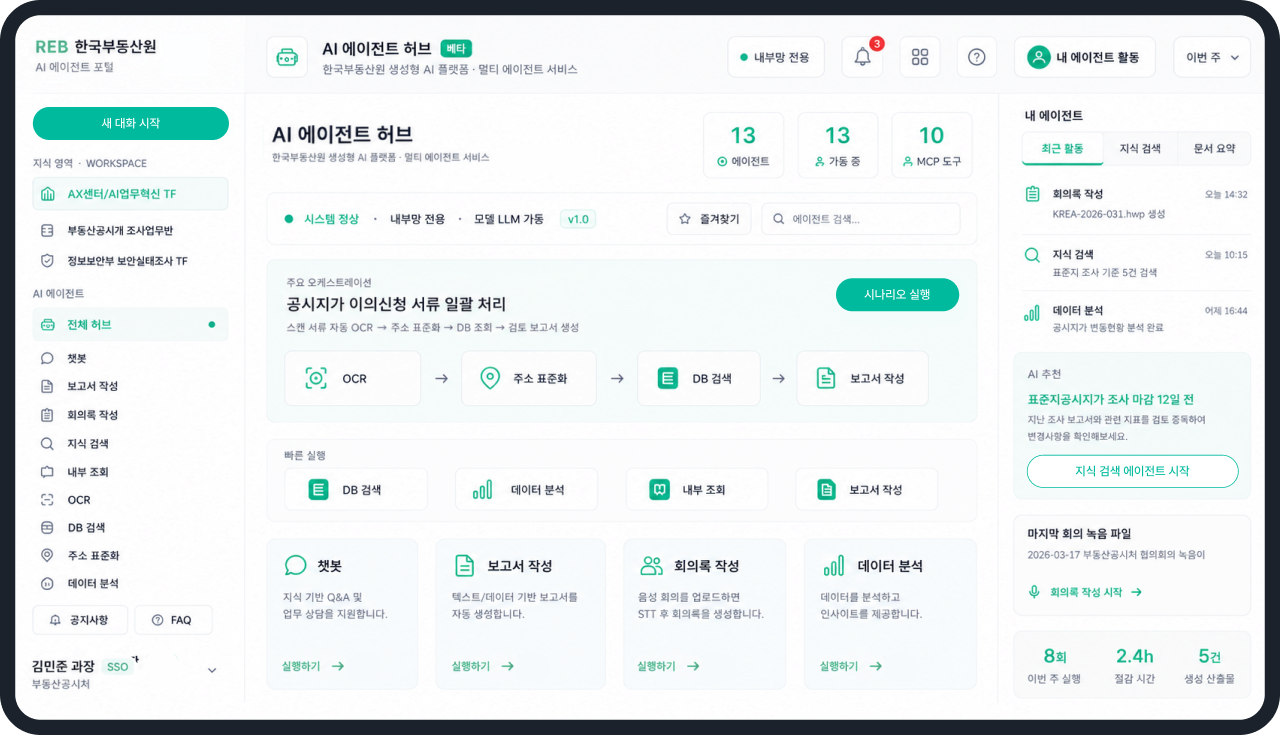
Specialist agents handle documents, speech and data, passing results on to a reviewable document and plan.
Overview
One request, passed between specialists, finished as a deliverable
Ask through the portal and the right agents work through documents, knowledge and data in sequence — a workflow you can run again and again.

Orchestration across agents
Each step’s result passes to the next agent, carrying multi-stage work through to the end
Evidence and security throughout
DRM and OCR preparation, cited sources, permissions, classification, and validation are built into the flow
Something you can review
Not just an answer — reports, minutes, review notes, and analyses you can use in real workArchitecture
Common modules that combine for the work at hand
Shared industrial and business capabilities are modular, so you can begin with what you need and expand in stages.
RAG Knowledge Search
Evidence-based knowledge search
Search internal documents and policies in plain language, with every answer linked to its evidence and source.
- Semantic search
- Find related documents and clauses even when wording differs
- Evidence and sources
- Show the original location and related documents with each answer
- Scoped retrieval
- Only search material allowed by domain and classification
Standard Report
Reports in your standard format
Enter the essentials and AgentQ organises a first draft in the format your organisation already uses.
- Choose a template
- Standard formats for weekly results, surveys, and market reports
- Automatic structure
- Place results, schedules, and plans in the correct sections
- Review the draft
- Check and edit generated content before formal use
Meeting Intelligence
Minutes from recorded speech
Upload a recording and reference material to separate speakers, summarise discussion, and identify follow-up work.
- Speech recognition
- STT and speaker separation turn each contribution into text
- Concise summary
- Separate topics, decisions, owners, and dates
- Finished minutes
- Apply attachments and the organisation’s standard format
Document Review
Policy-led document pre-review
Compare drafts and reports against internal rules automatically to flag likely breaches and missing information early.
- Preparation
- Read PDF, DOCX, HWP, and scanned documents
- Policy comparison
- Find and compare related clauses in selected guidance
- Classified findings
- Group risks and improvements by severity and evidence
Text2SQL Analytics
Data queries and analysis in plain language
Ask a business question without knowing SQL and receive the right data as tables, charts, and explanation.
- Interpret the question
- Turn the requested subject and conditions into SQL
- Permission-aware query
- Search only databases and fields the user may access
- Visualise results
- Show conditions and results as tables, charts, and a summary
Secure LLM Chat
Secure chat on a local LLM
Keep sensitive questions and documents off external networks by processing them only on the internal local LLM.
- No conversation storage
- Use an isolated session without retaining questions or answers
- No external connection
- Run all reasoning and document processing inside the network
- No training use
- Never use conversations or referenced documents as model training data
Runtime Pipeline
From raw input to a result ready for review
Prepare documents and data, retrieve evidence, reason and validate, then finish with approval and export.
Work input
Receive text, speech, documents, spreadsheets, and data-query requests
DRM and OCR
Unlock and recognise protected or scanned files, then make them searchable
RAG retrieval
Find relevant evidence and sources in permitted documents, policies, and vector databases
sLLM reasoning
The internal model summarises and analyses for the task, then passes the result onward
Validation and security
Check evidence match, confidence, personal data, and classification, requesting fixes where needed
Document, approve, export
Produce the official output and send it onward after review and approval
Results passed on automatically
OCR, lookups, and analysis carry forward to the next agent without re-entry
Permissions held throughout
Viewing scope and document classification apply from the first search to the final output
Prototype Workflows
Each agent takes its part, and the result comes together
The prototype chains separate capabilities in order, producing work a person can then review.
Document review · Appeal
Appeal package processing
Input — receive scans and attachments together Chain — OCR → address normalisation → database lookup → policy search Output — a review report draft with evidence and checkpoints
Data validation · Policy review
Suspicious transaction review
Input — define transaction conditions and target data Chain — database lookup → analysis → policy and law search → report Output — a review document with anomalies, evidence, and follow-ups
Ideal Use Cases
Where it makes the most difference
For work where documents, data, and rules are tangled together, and the output needs both evidence and control.

Lots of documents, no two alike
Protected files, scans, and recordings need OCR and STT before they can be searched, summarised, and reviewed

Work that must cite the rule it rests on
Find internal rules, laws, and guidance, record the source, and compare it with the document

Repeated data queries and analysis
Query databases and Excel or CSV in plain language, then produce statistics, outlier checks, and charts

Multi-step work someone retypes
Join OCR, address normalisation, data lookup, rule search, and reporting across several agents

Outputs that must become official documents
Write analysis and evidence into reports, minutes, or review notes, then put them through approval

Restricted environments that need control
Run an in-house sLLM and knowledge base with consistent permissions, classification, and usage records